USN RAG with sources
Overview
This example shows how to create a custom RAG application implementing a news question answering service.
The RAG instance will include:
- A Pinecone vector database containing edito from the USN dataset.
- A custom answer-generation chain configured to quote its sources.
- A custom post-generation processing function extracting the unique UDIDs of the retrieved documents.
More specifically, the generation chain customization relies on:
- Custom document formatting before injecting into the context provided to the LLM.
- A custom prompt template for generating the question-answering prompt.
Data Structure
the articles we want to build our application upon are stored in a JSON archive named USN_small.json.
This archive can be found in examples/advanced/data folder.
In USN_small.json, documents are stored in an array of objects:
[
    {
        "site_short_name": "USN",
        "PUBLISHED_AT": 1715923800000,
        "PUBLISHED": true,
        "CLOSED": false,
        "UDID": "a2szrctx:2213006:article",
        "TITLE": "En Arabie saoudite, The Line sera 70 fois plus petite que pr\u00e9vue",
        "TAGS_WEB_SLUG": [
            "btp-construction",
            "arabie-saoudite",
            "l-industrie-c-est-fou"
        ],
        "LAST_URL": "https:\/\/www.usinenouvelle.com\/article\/en-arabie-saoudite-the-line-sera-70-fois-plus-petite-que-prevue.N2213006",
        "content": "En Arabie saoudite, The Line sera 70 fois plus petite que pr\u00e9vue\nAnnonc\u00e9e en 2021, [...]"
    },
    ...
]
Difference with the standard USN model
- The attribute
contentis the concatenation ofTITLE,HEADLINEandBODYin the standard USN schema. - The attributes
HEADLINEandBODYhave been removed. PUBLISHED_ATis a millisecond timestamp
EmbeddingsPipeline
Our EmbeddingsPipeline is composed of 3 main components:
- Document loader: used to collect a batch of raw documents from a source (
.csv,.json, S3, Snowflake etc.) - Some document transformers: used to preprocess the documents before the vectorisations (chunking, encoding, anonimysation, addition of metadata etc.)
- Resource: in charge of embedding the documents (via the embeddings model) and store them in the associated vector store (FAISS, Pinecone, Snowflake etc.)
Resource
In this use case, documents amount can increase quickly. Therefore we recommand to rely on an external and production-grade vector database.
Here, we have chosen Pinecone.
In order to maximize the quality of the embeddings (document vectors) we will rely on OpenAI's embeddings service and especially their large embeddings model: text-embedding-3-large.
Alternative Embeddings Model
- For cost sensitive application one could consider
text-embedding-3-small. 🔗 more info - For data sensitive applications, one could consider using local embeddings model via langchain's
HuggingFaceEmbeddings. 🔗 more info
Let's setup our Resource.
1. Update your environment
In your .env file add the following keys:
Index prefilled with documents
One can set PINECONE_INDEX_NAME='usn-news-index' to connect to an already populated and ready to use index.
⚠️ This index is dedicated to demo purposes but shared accross the organisation.
Please consider carefully the data you would add into it in order to preserve the overall quality of the index.
How can I get my Pinecone API Key?
Please contact Pascal Mercier for details on how to get your own API key.
How can I use my own index?
- Request your Pinecone account creation
- Create your own index in Pinecone console
- Set your index name in your environment variables
2. PineconeResource
We create our PineconeResource by connecting to a given index and providing a Langchain Embeddings model.
import os

from langchain_openai import OpenAIEmbeddings

from rag.resources.pinecone import PineconeResource

RESOURCE = PineconeResource(
    name="USN_articles_pinecone",
    index_name=os.getenv("PINECONE_INDEX_NAME", "usn_news_index"),
    embeddings_model=OpenAIEmbeddings(model="text-embedding-3-large"),
)
Documents loader
As mentioned above our documents are stored in a JSON archive. Let's use Langchain JSONLoader to load our raw documents.
from langchain_community.document_loaders import JSONLoader

document_loader = JSONLoader(
    "examples/advanced/data/USN_small.json",
    jq_schema=".[]",
    content_key="content",
    metadata_func=lambda record, metadata: {
        k: v
        for k, v in record.items()
        if k != "content"  # Set all json keys except content as metadata
    },
)
About jq_schema
The JSONLoader uses a specified jq schema to parse the JSON files. It uses the jq python package. Check this manual for a detailed documentation of the jq syntax.
Calling at document_loader.load() would return a list of Langchain Documentsref such as:
Document(
    page_content: str = "En Arabie saoudite, The Line sera 70 fois plus petite que pr\u00e9vue\nAnnonc\u00e9e en 2021, [...]"
    metadata: dict = {
        "site_short_name": "USN",
        "PUBLISHED_AT": 1715923800000,
        "PUBLISHED": true,
        "CLOSED": false,
        "UDID": "a2szrctx:2213006:article",
        "TITLE": "En Arabie saoudite, The Line sera 70 fois plus petite que pr\u00e9vue",
        "TAGS_WEB_SLUG": [
            "btp-construction",
            "arabie-saoudite",
            "l-industrie-c-est-fou"
        ],
        "LAST_URL": "https:\/\/www.usinenouvelle.com\/article\/en-arabie-saoudite-the-line-sera-70-fois-plus-petite-que-prevue.N2213006",
    }
)
Documents transformers
We would like to perform 2 types of transformation on our raw documents:
- Chunk the documents in order to prevent from pushing document longer than the expected model content length
- Format the
PUBLISHED_ATtimestamp as a readable datetime.
Document Chunking
We are using a RecursiveCharacterTextSplitterref . It has the effect of trying to keep all paragraphs (and then sentences, and then words) together as long as possible, as those would generically seem to be the strongest semantically related pieces of text.
from langchain_text_splitters import RecursiveCharacterTextSplitter

text_splitter = RecursiveCharacterTextSplitter(chunk_size=1000, chunk_overlap=200)
Custom Document transformer
At the time this documentation is being written, There is no built-in function in Langchain to convert millisecond timestamps to datetime.
Therefore we need to build our own one extanding Langchain BaseDocumentTransformerref
A document transformer usually implement a transform_documents method taking a List[Document] as input and returning another List[Document].
from typing import List
from datetime import datetime

from langchain_core.documents import BaseDocumentTransformer, Document

class TimeStampToDatetime(BaseDocumentTransformer):
    def transform_documents(
        self, documents: List[Document], **kwargs
    ) -> List[Document]:
        for doc in documents:
            doc.metadata["PUBLISHED_AT"] = datetime.fromtimestamp(
                doc.metadata["PUBLISHED_AT"] / 1000
            )
        return documents
Wrap it
Everything is ready, lets build our EmbeddingsPipeline
from rag.core.embeddings import EmbeddingsPipeline

EMBEDDING_PIPELINE = EmbeddingsPipeline(
    name="USN RAG Embeddings Pipeline",
    document_loader=document_loader,
    document_transformers=[
        TimeStampToDatetime(),
        RecursiveCharacterTextSplitter(chunk_size=1000, chunk_overlap=200),
    ],
    vectorstore=RESOURCE,
)
Success
We are ready to embed our entiere collection of documents stored in our JSON Archive.
Danger Zone
If you configured the usn_news_index as your Pinecone index, the following step will write on a remote and shared database.
Do not proceed if you are not 100% confident in your action.
👉 Please feel free to contact Pascal Mercier if you have any question.
Run the following command to load, transform, vectorize and store the documents.
How can I test my pipeline?
We suggest you to run the pipeline intermediate steps (for instance in a Notebook) and investigate the resulting transformations
The following code will neither embed neither store new documents:
Custom RAG
Great ! We have a Resource filled with valuable documents.
Now let's build our custom answer generator !
Custom Generation Chain
RAGcurrently support langchain chains (aka Runnableref). Our chain will implement the following process:
graph LR
    q(💬 User Question) --> pass[▶️ Pass Through]
    docs(📑 Retrieved context documents) --> doc[📝 Format context documents]
    doc -->|inject| template[🧬 Prompt template] -->|query| llm[🔮 GPT-4o] -->|parse output| parser[📦 String Parser]
    pass -->|inject| template
📝 Format context documents
The input documents formatter processes the documents retrieved from the database and formats them for inclusion in the prompt.
Let's start by writing our custom python function. It takes a list of documents as input and return the string to insert in our prompt.
def format_docs(docs: List[Document]) -> str:
    formatted_docs = []
    for i, doc in enumerate(docs):
        doc.metadata["RETRIEVAL_INDEX"] = i
        formatted_docs.append(
            f'[{i+1}] Published: {doc.metadata["PUBLISHED_AT"]}\n"'
            + doc.page_content.replace(r"[\n\t]+", "\n")
            + '"'
        )
    return "\n\n".join(formatted_docs)
Runnable that we can interconnect with other langchain chain components.
from langchain_core.runnables import RunnablePassthrough

document_preparation = RunnablePassthrough.assign(
    context=(lambda x: format_docs(x["context"]))
)
What is going on here ?
A few things to know:
- The inputs of our chain will be a
dictcontaining (but not only) the keysquestionandcontext. RunnablePassthroughallows you to pass all previous inputs unchanged to the next step. It is useful for parallel processing for instance.- The method assigndoc of
RunnablePassthroughtakes an input value and adds the extra arguments to the output dictionary. It is similar to Pandas DataFrame.assigndoc logic.
So here, we simply override the context key with our formated documents string. It is an easy way to provide additional data from a python function.
Note in the note: If your are not interested in keeping all previous inputs, consider using RunnableLambdaref
🧬 Prompt template
The prompt template defines the structure of the prompts sent to the language model for generating answers.
Here we opted for a rather simple two steps prompt:
1. System prompt
Let's give our LLM a few instructions.
System Prompt
"You are a news assistant for question-answering tasks. Use the following pieces of retrieved news
articles to answer the question. Mention your sources in-text with <rag_source>[n°]</rag_source> notation.
Be aware that the current date is {datetime.today().strftime('%m/%d/%Y')} If you don't know the answer, just say that you don't know. Use three sentences maximum and keep the answer concise."
What is a system prompt?
A system prompt is a way to provide context, instructions, and guidelines to the LLM before presenting it with a question or task. By using a system prompt, you can set the stage for the conversation, specifying the LLM's role, personality, tone, or any other relevant information that will help it better understand and respond to the user’s input.
About the code in the prompt
The code in the prompt is computed at build time (aka when the server starts).
It means the textual information associated with these code section remains static along the server life.
For a more dynamic input entry, one should consider adding a custom step similar to the "Format context documents" above.
Disclaimer: System prompt compatibility
Not all LLMs are compatible with system prompts. One should check compatibility of the chosen model.
However, as of June 2024, most LLMs compatible with Langchain's ChatModeldoc such as OpenAI GPTs and Anthropic Claude accept such input.
2. Human message template
Our system prompt will systematically be followed by a human message. This message contains the details of the specific task we ask the LLM to solve.
Human Message Prompt
" Context:\n {context}\n\n Question:\n {question}"
As you can see this is a very basic prompt. Here the LLM will mostly build its answers from:
- Our system prompt (underlying commands)
- The content of the documents chunks retrieved and injected in
{context} - The user input injected in
{question}.
You can play around this to adjust the tone or provide additional instruction from the user. It's fully customizable.
The resulting code:
from langchain_core.messages import SystemMessage
from langchain_core.prompts import ChatPromptTemplate, HumanMessagePromptTemplate

chat_template = ChatPromptTemplate.from_messages(
    [
        SystemMessage(
            content=(
                f"You are a news assistant for question-answering tasks. Use the following pieces of retrieved news"
                f" articles to answer the question. Mention your sources in-text with "
                f"<rag_source>[n°]</rag_source> notation. "
                f"Be aware that the current date is "
                f"{datetime.today().strftime('%m/%d/%Y')} If you don't know the answer, just say that you don't"
                f"know. Use three sentences maximum and keep the answer concise."
            )
        ),
        HumanMessagePromptTemplate.from_template(
            " Context:\n {context}\n\n Question:\n {question}"
        ),
    ]
)
🔮 External Generative Model (LLM)
Initialize the connector to GPT-4o API used to generate answers.
from langchain_openai import ChatOpenAI, OpenAIEmbeddings

llm = ChatOpenAI(model="gpt-4o", temperature=0)
4. 📦 Post Generation Processing
We want to capture all the LLM answer content and return it to the user.
More advanced output parser
Langchain provides a wide range of LLM Outputs Parsersdoc, such as:
You can also implement your own custom logicdoc and plug it to your chain.
5. 🌯 Wrap it
Let's plug all components together.
Success
You've build your first custom answer generation chain!
Custom Post-Generation Processing Function
In our case, the output our generation chain is a string. This string will be inserted in the overall output along side with our retrieved documents and the user question.
Sometime, it can be usefull to post-process the entiere dictionnary output or provide addtional data (for web developpers commodity for instance).
Let's take a rather simple example of processing: The following function extracts unique UDIDs from the retrieved documents after generation.
from typing import Dict, Any

def unique_udid(outputs: Dict[str, Any]) -> str:
    return list(set([doc.metadata["UDID"] for doc in outputs["context"]]))
These post-processing functions (named extras) takes a dictionnary as input and returns the data to add to outputs (similarly to the langchain Runnable.assign method).
Initializing the RAG Instance
Finally! Here is the time.
Lets connect all together our document resource, our generation chain and our post-processing function.
from rag.core.generator import RAG

USN_RAG = RAG(
    name="USN RAG",
    resources=[RESOURCE],
    generation_chain=chain,
    extras={"unique_udid": unique_udid},
)
Success
Congrats, you've implemented your own Generative Q&A application.
Register your app in the API
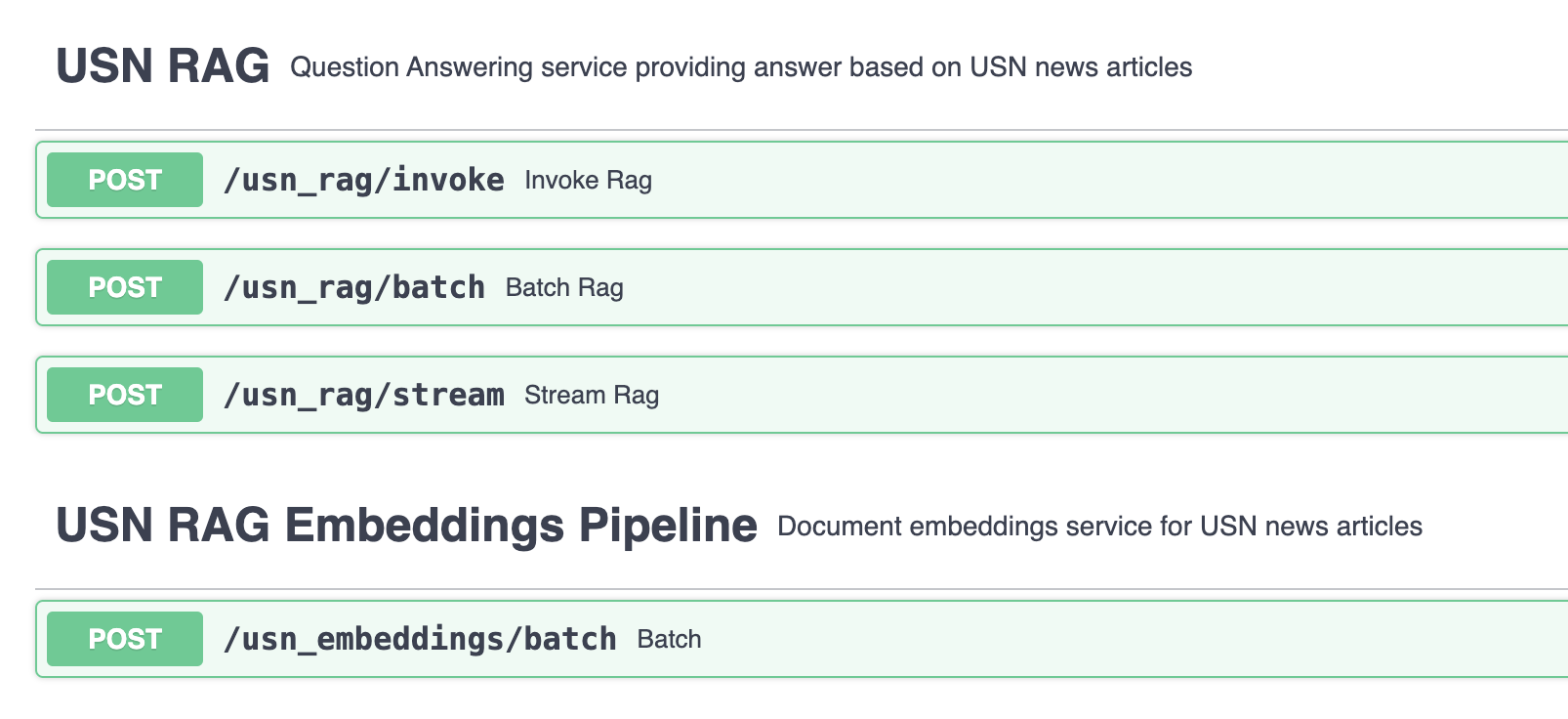
in an api.yaml file, add your RAG and EmbeddingPipeline
The code to add:
services:
  - name: "USN RAG"
    api_prefix: "usn_rag"
    description: "Question Answering service providing answer based on USN news articles"
    module_path: "examples/advanced/usn_rag_with_sources.py"
  - name: "USN RAG Embeddings Pipeline"
    api_prefix: "usn_embeddings"
    description: "Document embeddings service for USN news articles"
    module_path: "examples/advanced/usn_rag_with_sources.py"
 ✨ Tada ✨
The end
🎉 Congrats!
You've reach the end of this example.